
Download ArtistInterview – AI‑Powered Musician Q&A Generator
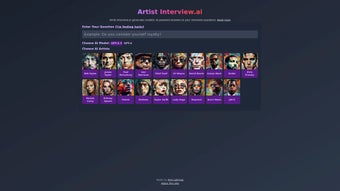
ArtistInterview.ai is an innovative AI‑driven tool that lets fans, podcasters, journalists, and content creators generate realistic interview‑style Q&A sessions with some of the world’s most beloved musicians. By mining an artist’s own lyrics, the platform crafts responses that echo the singer‑songwriter’s unique voice, phrasing, and thematic concerns. Whether you want to explore the poetic depths of Bob Dylan, the theatrical flair of Lady Gaga, or any of the other curated icons, ArtistInterview.ai delivers a secure, free‑to‑try experience that feels like you’re sitting across a microphone from the legend themselves. The interface is designed for simplicity: choose an artist, pick an AI model (GPT‑3.5 or GPT‑4), type your questions, and watch the algorithm synthesize answers that sound as if they were lifted straight from the artist’s catalog. This powerful blend of natural language processing and musicology opens a fresh window into creative inspiration, making it a valuable resource for anyone who wishes to delve deeper into the mind of their favorite musician.
Key Features and What Sets ArtistInterview Apart
- AI‑Powered Interview Engine: Leverages OpenAI’s GPT‑3.5 and GPT‑4 models to generate context‑aware answers.
- Lyric‑Based Insight: Answers are constructed from the artist’s own lyrics, ensuring authentic tonal alignment.
- Curated Artist Library: Includes iconic figures such as Bob Dylan, Lady Gaga, The Beatles, and more, with plans for expansion.
- Custom Question Input: Users can type any question—from technical songwriting queries to personal philosophy.
- Model Selection Flexibility: Switch between GPT‑3.5 for faster responses or GPT‑4 for deeper, nuanced answers.
- Export Options: Download interview transcripts as PDF or plain text for easy sharing.
- Secure Cloud Processing: All data is encrypted during transmission and never stored permanently.
- Responsive Design: Works seamlessly on desktop browsers and mobile devices.
Pros
- Authentic‑sounding responses that reflect an artist’s lyrical style.
- Intuitive UI that requires no technical background.
- Free tier available for casual users.
- Option to choose between two powerful AI models.
- Quick export functionality for content creators.
Cons
- Current artist roster is limited; niche musicians may not be available.
- GPT‑4 responses can be slower during peak usage.
- No offline mode—requires an internet connection.
- Free tier imposes a daily question limit.
- Advanced customization (e.g., tone tweaking) is not yet supported.
Installation, Usage Guide, and Compatibility
ArtistInterview.ai is a web‑based SaaS application, which means there is no traditional “installation” process. Users simply visit the official website, create a free account, and start generating interviews instantly. Below is a step‑by‑step guide to get you up and running:
- Access the Platform: Open your preferred browser (Chrome, Firefox, Safari, Edge) and navigate to artistinterview.ai.
- Create an Account: Click “Sign Up,” enter your email address, set a secure password, and verify your account via the confirmation link.
- Select an Artist: From the drop‑down menu, choose an artist from the curated list. The platform displays a brief bio and a sample lyric excerpt for context.
- Choose an AI Model: Opt for GPT‑3.5 for rapid responses or GPT‑4 for more elaborate, nuanced answers.
- Enter Your Questions: Type one or multiple questions in the text box. Questions can range from “What inspired the chorus of ‘Like a Rolling Stone’?” to “How do you approach stage costumes?”
- Generate the Interview: Hit “Generate.” Within seconds, the AI returns a response that mirrors the artist’s lyrical diction.
- Review & Export: Edit any part of the generated text if needed, then click “Download” to save the interview as a PDF or plain text file.
Supported Operating Systems:
- Windows 10 and later (any modern browser)
- macOS 11 (Big Sur) and later
- Linux distributions with a recent Chromium‑based browser
- Android 8.0+ (via mobile browser)
- iOS 13+ (Safari or Chrome)
Because ArtistInterview.ai runs entirely in the cloud, it automatically receives updates and improvements without any user intervention. Security is handled through HTTPS encryption, and the platform adheres to GDPR guidelines for data privacy. If you encounter any issues, a built‑in help center and live chat support are available 24/7.
Frequently Asked Questions
Can I use ArtistInterview.ai for commercial projects?
Yes. The free tier allows limited commercial use, but for unlimited commercial projects we recommend upgrading to the Pro plan, which includes higher request limits and a commercial‑use license.
How does the AI ensure the answers sound like the selected artist?
The engine parses the artist’s entire lyric catalogue, builds a contextual language model, and then guides GPT‑3.5/4 to generate responses that mimic the poetical patterns, vocabulary, and recurring themes of that artist.
Is my data stored after I generate an interview?
All user inputs are processed in real‑time and are not retained on the server beyond the session. We keep no permanent logs of your questions or generated content, ensuring privacy.
Can I add my own artist to the platform?
Currently the artist list is curated by the development team, but we accept community suggestions. If you have a public lyric database for a particular musician, you can submit a request through the “Suggest an Artist” form.
What are the pricing options after the free trial?
ArtistInterview.ai offers three plans: Free (limited daily queries), Pro ($9.99/month) with higher limits and GPT‑4 priority, and Enterprise (custom pricing) for bulk usage and white‑label integration.
Final Verdict – Should You Download ArtistInterview?
ArtistInterview.ai delivers a compelling blend of AI sophistication and music‑centric creativity. The ability to generate interview‑style content that feels genuinely tied to an artist’s lyrical voice is both novel and practical for creators seeking fresh material. While the current roster of artists is modest, the platform’s roadmap promises expansion, and the underlying technology is solid enough to support that growth. The free tier offers enough functionality for casual fans, while the Pro plan unlocks deeper, more responsive GPT‑4 interactions for professionals. In short, if you’re a music journalist, podcast host, or simply a devoted fan who loves to imagine “what if” conversations with legends, ArtistInterview.ai is a worthwhile tool to download and explore.
Call to Action: Ready to start your first AI‑driven interview? Sign up for a free account today and experience the future of music storytelling.



.png)



